How to play
The Cyberpunk TCG explained in plain words: zones, turns, Gigs, RAM and keywords. For the exact wording, use the Rules browser.
01The goal
Two players sit down as rival fixers and race to finish jobs. Every job you land is a Gig, a polyhedral die parked in your Gig area, and the first fixer to start a turn holding seven of them takes the whole run.
You gain one Gig per turn for free, so the game is really about the Gigs you take from the other side of the table. Units attack the rival Gig area to steal dice; Blockers, Programs and Gear are how you stop them. Everything you play is paid for in Eddies (€$), the money you make by selling cards and by spending your own Legends.
02The play area
1Fixer area
Your six unrolled dice: d4, d6, d8, d10, d12 and d20, stacked from the smallest up. Each turn you take one out, roll it, and it becomes a Gig. They are not yours yet: cards can never target dice sitting here.
2Gig area
The jobs you have landed. Every die here is a Gig you control, kept at the value it was rolled on. Seven of them at the start of your turn wins the game, and this is the area rival Units attack.
3Field
Where your Units, Gear and lingering Programs live once played. Everything arrives Lagging (it cannot act the turn it lands) and there is no limit to how many Units you can field.
4Eddies area
Your bank. Cards sold from your hand are turned face down here and each one is worth 1 €$. Spent Eddies ready again at the start of your next turn, so your income is reusable, not consumed.
5Legends area
Your three Legends, shuffled and placed face down at the start of the game. Each one can be spent as 1 €$, and once per turn you can Call one: pay 1 €$ to flip it face up and use its ability.
6Deck
Your 40–50 card main deck, face down and untouchable. You draw from the top; if you are ever asked to draw with an empty deck, you lose on the spot.
7Trash
The discard pile. Defeated Units, used Programs and anything an effect throws away ends up here, face up and readable by both players.
8Hand
The cards you are holding. Only you can see them, there is no maximum hand size, and your rival is always allowed to ask how many you hold.
03Setup
- Decide who goes first: Randomise it however you both agree. Rolling a d20 each and taking the higher number is the usual method. The winner chooses to go first or second.
- Shuffle and place your deck: Shuffle your 40–50 card main deck, offer it to your rival to cut, and put it face down in your deck area.
- Randomise your Legends: Shuffle your three Legends the same way and lay them face down in your Legends area. Nobody knows which is which until one is Called.
- Line up the Fixer area: Place your dice from the bottom up: d4, d6, d8, d10, d12, then d20. That order is also the order you will roll them in.
- Draw six and mulligan once: Draw six cards. Each player may take a single mulligan: shuffle the whole hand back and draw six new cards. The player going first declares first.
- The starting player pays a tax: Going first, your two left-most Legends start the game spent, so they do not ready on your first turn.
04A turn
- Ready: Everything spent in your Legends area, your Field and your Eddies area stands back up, and start-of-turn effects resolve. This is also the moment the game checks whether you hold seven Gigs: if you do, you have already won.
- Draw 1: Take the top card of your deck. If there is nothing left to take, you lose immediately, so keep an eye on how deep you are digging.
- Gain a Gig: Take a die out of your Fixer area, roll it, and drop it in your Gig area at the value it rolled. You choose which die, but the d20 may only be taken once every other die has left the Fixer area.
- Main phase: sell: Once per turn you may sell a single card from your hand that carries the Sell tag (the €$ in its top-left corner). It goes face down in your Eddies area and is worth 1 €$ from now on.
- Main phase: pay and play: Play Units, Gear and Programs by paying their cost in Eddies. Face-down Legends can be spent as 1 €$ each, so your Legends double as emergency cash.
- Main phase: Call a Legend: Once per turn, pay 1 €$ to flip one of your Legends face up. It joins the game with its ability online. You can also Call a Legend defensively, while your rival is attacking you.
- Main phase: attack: Spend ready Units to attack. You can hit a spent rival Unit or the rival Gig area. When you are done, pass the turn.
05Attacks & stealing Gigs
To attack you spend a ready Unit (one that is not Lagging) and pick a target: a spent rival Unit, or the rival Gig area if it holds at least one die.
Before anything happens the defender gets a React Step: they may Call a Legend, fire off Quick effects, or activate a Blocker, which throws that Unit in front of the attack and makes it the new defender.
If the attack ends up against a Unit, the two compare power. The higher power wins and defeats the other; equal power means both lose and both go to the trash.
If the attack goes through to the Gig area, the attacker steals a Gig, plus one more for every full 10 power it has. A 9-power Unit takes one die, a 12-power Unit takes two.
06Winning
Start any of your turns with seven or more Gigs in your Gig area and you win immediately, before you draw or roll.
If both Fixer areas empty out and neither player has closed it (about seven turns each), the game goes into overtime. In overtime you no longer have to wait for your turn: the moment you hold seven Gigs, you win.
There is one way to lose that has nothing to do with Gigs: being asked to draw from an empty deck. You can also concede at any point.
07Reading a card
The four card types do not lay their information out the same way. Follow the arrows: the number on the card matches the number in the list underneath.
Legend
Three of them anchor your crew, face down at the start, and they set your RAM limits. Name across the top, power bottom right.
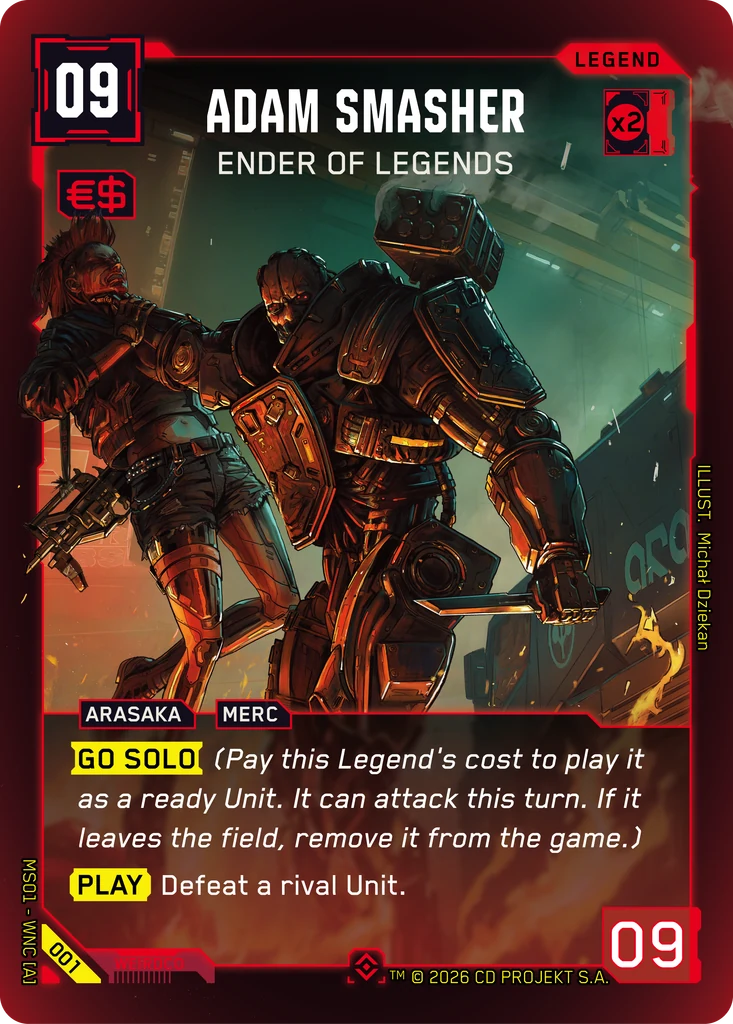 123456789101Cost2Sell tag3Tags4Textbox5Set and number6Type7Name and subtitle8RAM and colour9Illustrator10Power
- 1Cost Top left, in Eddies (€$). What you pay to put the card into play. A Legend can have a null cost ( – ), which cannot be paid.
- 2Sell tag The €$ badge under the cost. Only a card carrying it can be sold from your hand, once per turn, for one Eddie.
- 3Tags Arasaka, Merc, Netrunner, Cyberware… every card has at least one, and card effects refer to them constantly. In rules text they appear in bold capitals.
- 4Textbox The rules text. Keywords like Play, Attack, Blocker, Quick or Go Solo are marked; anything in italics between brackets is reminder text and changes nothing.
- 5Set and number Down the left edge: product code, block, and the card number in its set. The rarity symbol sits at the bottom centre.
- 6Type Top right: Legend, Unit, Gear or Program. It decides where the card can be played and what it can do.
- 7Name and subtitle A Legend carries its name across the top centre, subtitle right underneath. Deck building reads the name alone: two Legends named V cannot sit in the same crew.
- 8RAM and colour The number in the symbol is the RAM the card demands; the highlighted corners and the border give its colour. Your limit in a colour is the total RAM of your Legends of that colour.
- 9Illustrator Down the right edge, the artist who painted the card.
- 10Power Bottom right. What a Unit compares in a fight, and how many Gigs it steals: one, plus one more per full 10 power.
Unit
Your fighters. The name sits low, just above the textbox and aligned left, which is the quickest way to tell a Unit from a Gear at a glance.
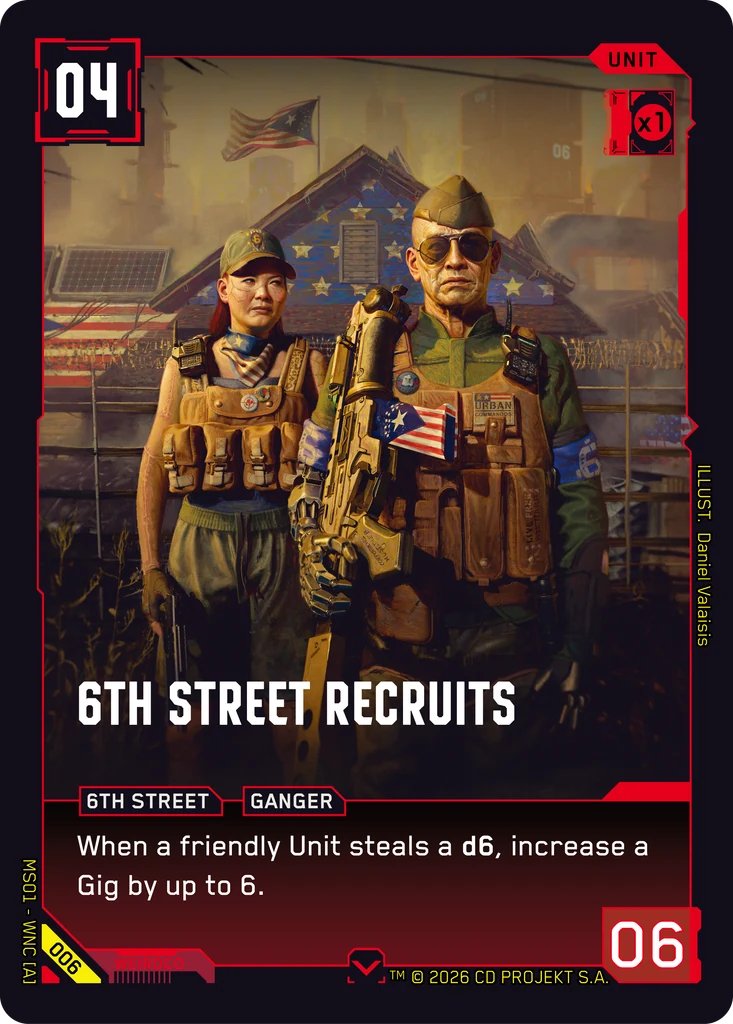 1234567891Cost2Name and subtitle3Tags4Textbox5Set and number6Type7RAM and colour8Illustrator9Power
- 1Cost Top left, in Eddies (€$). What you pay to put the card into play. A Legend can have a null cost ( – ), which cannot be paid.
- 2Name and subtitle On a Unit the name sits just above the textbox, aligned left. The subtitle follows it, and the three-copy limit reads name and subtitle together.
- 3Tags Arasaka, Merc, Netrunner, Cyberware… every card has at least one, and card effects refer to them constantly. In rules text they appear in bold capitals.
- 4Textbox The rules text. Keywords like Play, Attack, Blocker, Quick or Go Solo are marked; anything in italics between brackets is reminder text and changes nothing.
- 5Set and number Down the left edge: product code, block, and the card number in its set. The rarity symbol sits at the bottom centre.
- 6Type Top right: Legend, Unit, Gear or Program. It decides where the card can be played and what it can do.
- 7RAM and colour The number in the symbol is the RAM the card demands; the highlighted corners and the border give its colour. Your limit in a colour is the total RAM of your Legends of that colour.
- 8Illustrator Down the right edge, the artist who painted the card.
- 9Power Bottom right. What a Unit compares in a fight, and how many Gigs it steals: one, plus one more per full 10 power.
Gear
Equipment, and the only type with two textboxes: the top one applies to the Gear itself, the bottom one is inherited by whatever carries it.
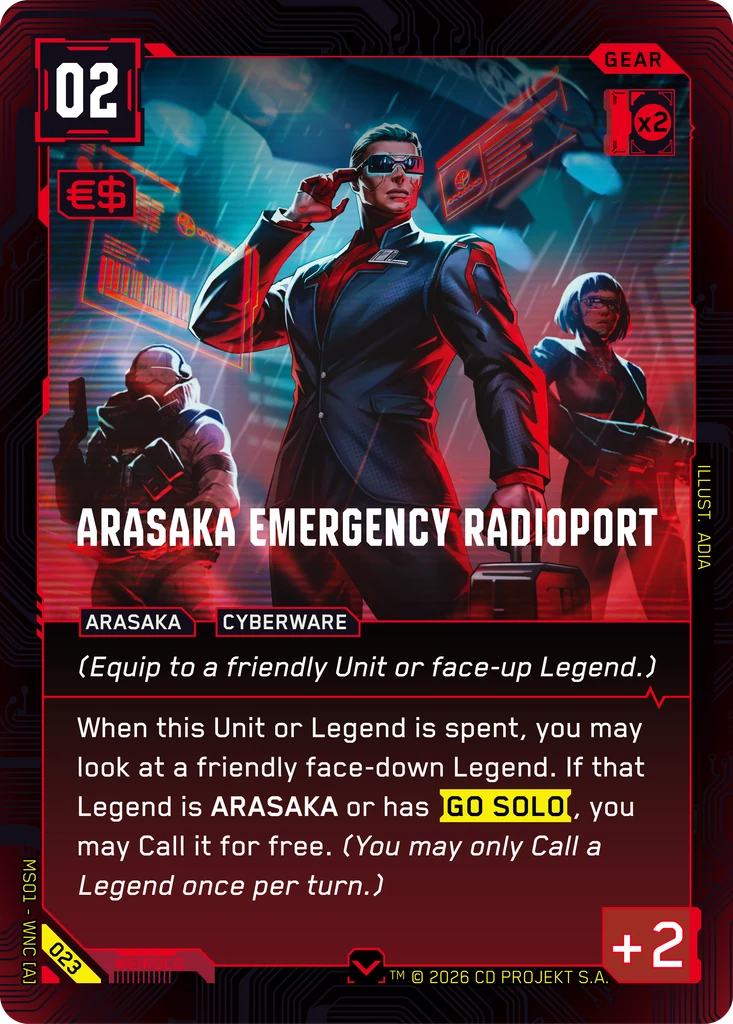 12345678910111Cost2Sell tag3Tags4Top textbox5Bottom textbox6Set and number7Type8RAM and colour9Illustrator10Name and subtitle11Power
- 1Cost Top left, in Eddies (€$). What you pay to put the card into play. A Legend can have a null cost ( – ), which cannot be paid.
- 2Sell tag The €$ badge under the cost. Only a card carrying it can be sold from your hand, once per turn, for one Eddie.
- 3Tags Arasaka, Merc, Netrunner, Cyberware… every card has at least one, and card effects refer to them constantly. In rules text they appear in bold capitals.
- 4Top textbox Applies to the Gear itself, when you play it. It is not inherited by the Unit or Legend you equip.
- 5Bottom textbox Read as if printed on the Unit or Legend carrying the Gear. This is the half that keeps working after the equip.
- 6Set and number Down the left edge: product code, block, and the card number in its set. The rarity symbol sits at the bottom centre.
- 7Type Top right: Legend, Unit, Gear or Program. It decides where the card can be played and what it can do.
- 8RAM and colour The number in the symbol is the RAM the card demands; the highlighted corners and the border give its colour. Your limit in a colour is the total RAM of your Legends of that colour.
- 9Illustrator Down the right edge, the artist who painted the card.
- 10Name and subtitle Gear and Programs centre the name just above the textbox.
- 11Power A Gear shows a modifier (+2 here). It is added to whatever it is equipped to, and only an effect naming the Gear can change it.
Program
One shot, then gone. No power value: a Program does what it says and heads to the trash.
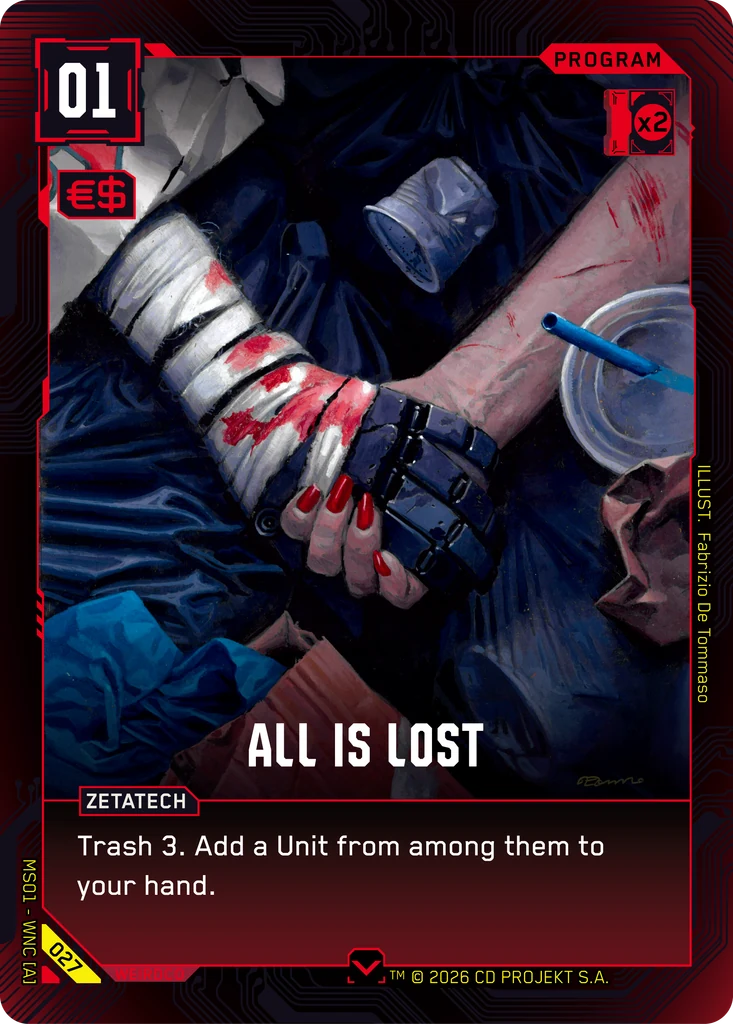 1234567891Cost2Sell tag3Tags4Textbox5Set and number6Type7RAM and colour8Illustrator9Name and subtitle
- 1Cost Top left, in Eddies (€$). What you pay to put the card into play. A Legend can have a null cost ( – ), which cannot be paid.
- 2Sell tag The €$ badge under the cost. Only a card carrying it can be sold from your hand, once per turn, for one Eddie.
- 3Tags Arasaka, Merc, Netrunner, Cyberware… every card has at least one, and card effects refer to them constantly. In rules text they appear in bold capitals.
- 4Textbox The rules text. Keywords like Play, Attack, Blocker, Quick or Go Solo are marked; anything in italics between brackets is reminder text and changes nothing.
- 5Set and number Down the left edge: product code, block, and the card number in its set. The rarity symbol sits at the bottom centre.
- 6Type Top right: Legend, Unit, Gear or Program. It decides where the card can be played and what it can do.
- 7RAM and colour The number in the symbol is the RAM the card demands; the highlighted corners and the border give its colour. Your limit in a colour is the total RAM of your Legends of that colour.
- 8Illustrator Down the right edge, the artist who painted the card.
- 9Name and subtitle Gear and Programs centre the name just above the textbox.
08Building a crew
A legal deck is exactly three Legends with different names, plus a main deck of 40 to 50 cards. The Legends are not part of that count.
No more than three copies of the same name-and-subtitle combination in the main deck, whatever printing they come from.
The RAM rule is the interesting one. Each Legend supplies RAM to its own colour, and your limit in a colour is the total RAM of your Legends of that colour. A main-deck card is legal only if its RAM is at or below your limit in its colour, which also means a colour with no Legend at all is completely closed to you.
RAM in practice
Two Green Legends with 2 RAM each and one Red Legend with 2 RAM give you a Green limit of 4 and a Red limit of 2. Green cards up to 4 RAM are fine, Red cards are capped at 2 RAM, and Blue and Yellow cards cannot go in the deck at all. The Crew Builder enforces all of this while you build.
09Keyword glossary
| Keyword | What it does | Cards |
|---|---|---|
| Adrenaline | This Unit ignores Lag: it can attack the turn it is played. | 4 |
| Attack | Triggered ability: when this Unit attacks, do the effect that follows. | 13 |
| Blocker | When a rival Unit attacks your Gig area, you may redirect the attack to this ready Unit instead, forcing a fight. | 13 |
| Bottom-deck | Put the card(s) at the bottom of the owner's deck, in any order. | 13 |
| Braindance | A Program tag. Some Netrunner cards replay or retrieve BRAINDANCE Programs from the trash. | 2 |
| Call | Triggered ability: when you Call this Legend (spend 1 €$ to flip it face-up, once per turn, in your main phase or as a reaction to an attack), do the effect that follows. | 7 |
| Defeat | Send a Unit to its owner's trash. Units are defeated when they lose a fight or when an effect defeats them. | 31 |
| Defeated | Triggered ability: when this Unit is defeated (loses a fight or is defeated by an effect) and goes to the trash, do the effect that follows. | 7 |
| Eddies (€$) | Night City currency. Each face-down card in your Eddies area is 1 €$. Spend them to pay costs. Legends can also be spent as 1 €$ each. | 23 |
| Equip | Gear attaches to a friendly Unit or face-up Legend and moves with it. Gear gives its bonuses and abilities to the equipped card. | 23 |
| Fixer | The Fixer area holds your six dice at the start. Each turn take one (any but the d20, which is last), roll it and move it to your Gig area. | 2 |
| Gigs | Jobs represented by dice (d4 → d20). Gain 1 per turn from the Fixer area. Start your turn with 7 Gigs to win. Attack the rival Gig area to steal them. | 63 |
| Go Solo | Legend ability: pay this Legend's cost to play it as a ready Unit that can attack this turn. If it leaves the field, remove it from the game. | 11 |
| Lag | All Units enter the field with Lag until end of turn: they can't attack or use self-spend effects. Adrenaline and Go Solo ignore it. | 0 |
| Play | Triggered ability: when this card is played (enters the field or resolves), do the effect that follows. | 27 |
| Quick | You can play or activate this as a reaction (during your rival's turn or when a rival Unit attacks), not only in your main phase. | 12 |
| Ready | Upright. Only ready Units can attack and only ready Units can be attacked. Spent cards ready at the start of your turn. | 25 |
| Sell | Once per turn, sell a card from your hand that has the Sell tag: reveal it, then put it face-down in your Eddies area as 1 €$. | 1 |
| Spend | Activated ability: turn the card sideways (spend it) to use the effect. A spent card readies at the start of your next turn. Units with Lag can't use self-spend effects. | 17 |
| Steal | Take Gig dice from your rival's Gig area into yours. Attacking a Gig area with a Unit steals 1 Gig, +1 for every 10 power. | 22 |
| Street Cred | The sum of the values showing on your Gig dice. Some effects need a minimum Street Cred to activate. | 13 |
| Trash | As a keyword: put the top card of your deck into your trash ("Trash 3" = top three). As a zone: your discard pile: defeated, spent and used cards go there. | 18 |
10FixerBot commands
FixerBot answers card, keyword and rules questions inside Discord, using exactly the data this site runs on. Add it to a server and use the slash commands below.